
Download NavigaWeb Tech APK – Technology News, PC Guides, Free Apps
Overview
NavigaWeb Tech is a free Android application designed to deliver timely and relevant content on technology trends, computer guides, and curated free software. Developed by Claudio Pomhey, the app serves as a digital hub for users seeking reliable information on internet developments, mobile optimization, and productivity tools. It is particularly suited for consumers and tech enthusiasts who want to stay informed about the latest innovations without navigating through fragmented sources.
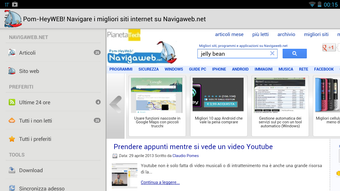
The application includes a dedicated section for verified free Android apps, offering users a trusted list of tested tools that can enhance smartphone functionality. Additionally, it features the Pom-HeyWEB blog, a lightweight Italian counterpart to international tech publications like Mashable and LifeHacker, providing in-depth articles in a streamlined format. Users can preview article titles and save content for offline reading, making it convenient for on-the-go learning.
The app also integrates with Google News, allowing users to expand their access to real-time technology updates through the Explore tab. With daily updates and a focus on practical guides, NavigaWeb Tech supports users in maximizing their device capabilities and staying ahead in a fast-evolving digital landscape.
Key Features & Capabilities
- Curated Technology News – Delivers up-to-date articles on internet trends, software releases, and digital innovation, helping users stay informed about current developments.
- Free PC and Mobile Software Guides – Offers step-by-step instructions and recommendations for useful free programs, enabling users to enhance their device performance and workflow.
- Verified Free Android Apps Section – Features a handpicked list of tested and approved free applications, reducing the risk of downloading unreliable or harmful software.
- Offline Reading Support – Allows users to save articles for later viewing, ideal for users with limited connectivity or those who prefer to read during commutes.
- Google News Integration – The Explore button opens a dedicated tab for Google News technology articles, expanding access to broader, real-time industry coverage.
- Customizable Notifications – Users can manage how and when they receive alerts for new content, including options to disable automatic updates or modify notification appearance.
These features collectively support users in discovering valuable tools, understanding emerging tech, and managing their digital experience efficiently. The integration of curated content with external sources like Google News ensures a balanced and comprehensive information flow, while the offline functionality enhances accessibility. The app’s structure promotes long-term engagement by combining timely updates with practical utility, making it a useful companion for daily digital life.
User Interface, Workflow & Performance
The user interface of NavigaWeb Tech is designed with simplicity and accessibility in mind, featuring a clean layout that prioritizes content readability. Navigation is intuitive, allowing users to switch between sections such as news, guides, app listings, and the Pom-HeyWEB blog with minimal effort. The app’s workflow supports a seamless reading experience, from previewing headlines to saving articles for offline access.
Users can easily tap on content to expand details or initiate downloads. The performance of the application appears consistent with standard Android app behavior, though specific resource usage data was not provided. The developer did not specify CPU or RAM consumption details.
Stability during typical usage is expected to be reliable, given the app’s lightweight nature and focus on content delivery. Automatic updates are enabled by default but can be disabled in the settings, allowing users to control bandwidth and storage usage. Overall, the app maintains a responsive interface without noticeable lag during navigation or content loading, aligning with general expectations for a content-focused Android application.
Compatibility & System Requirements
NavigaWeb Tech is designed for Android devices and is compatible with a wide range of smartphones and tablets running the supported OS version. The app’s latest version, 1.4.0, was released on February 16, 2024, and is available for free on the Google Play Store. The installation size is 15.7 MB, indicating a lightweight footprint that should not significantly impact device storage.
The developer did not specify exact system requirements, such as minimum Android version or hardware specifications. Compatibility information was partially provided, leaving users to rely on general Android compatibility standards. It is recommended to ensure the device meets the baseline requirements for running modern Android applications.
The app’s functionality is optimized for mobile screens, with no indication of desktop or tablet-specific adaptations. Users should verify compatibility with their specific device model and OS version before installation.
Pros and Cons
Pros
- Free to download and use with no hidden costs
- Curated content from a trusted source with verified app recommendations
- Supports offline reading for articles and guides
- Integrates with Google News for expanded tech coverage
- Customizable notification settings for personalized experience
- Lightweight design with minimal storage impact (15.7 MB)
Cons
- Exact system requirements were not listed
- Performance details such as CPU or RAM usage were not provided
- Only available on Android, limiting cross-platform access
- No desktop or web version currently available
- Content is primarily in Italian, which may limit accessibility for non-Italian speakers
FAQ Section
Is NavigaWeb Tech available for iOS devices?
As of now, the app is only available for Android. There is no official version for iOS devices.
Can I use NavigaWeb Tech without an internet connection?
Yes, you can access saved articles and guides offline. The app allows users to download content for later reading, which is useful when connectivity is limited.
Is the app safe to download and install?
Yes, the app is available through the Google Play Store and is free from known malware. It is developed by Claudio Pomhey and regularly updated with new content.
How often is the app updated?
The app receives regular updates. The latest version, 1.4.0, was released on February 16, 2024.
Does NavigaWeb Tech require a subscription to access content?
No, all content is available for free. There are no paywalls or subscription tiers.
Final Thoughts
NavigaWeb Tech stands out as a reliable and accessible source for technology news, practical guides, and vetted free applications. Its focus on curated, trustworthy content makes it ideal for Android users who want to stay informed and make smarter choices about the tools they use. The inclusion of offline reading, customizable notifications, and Google News integration enhances usability and personalization.
While the app is limited to Android and primarily serves Italian-speaking audiences, its lightweight design and free access make it a valuable addition to any tech-savvy user’s toolkit. For those seeking daily insights into the digital world and practical advice on software and devices, NavigaWeb Tech delivers consistent value. Download NavigaWeb Tech now to stay ahead in the fast-paced world of technology.





.png)

